How to implement a QR code menu in your restaurant to speed up service?

Running a busy restaurant means every second counts. Long wait times frustrate guests, slow down table turnover, and put extra pressure on your staff.

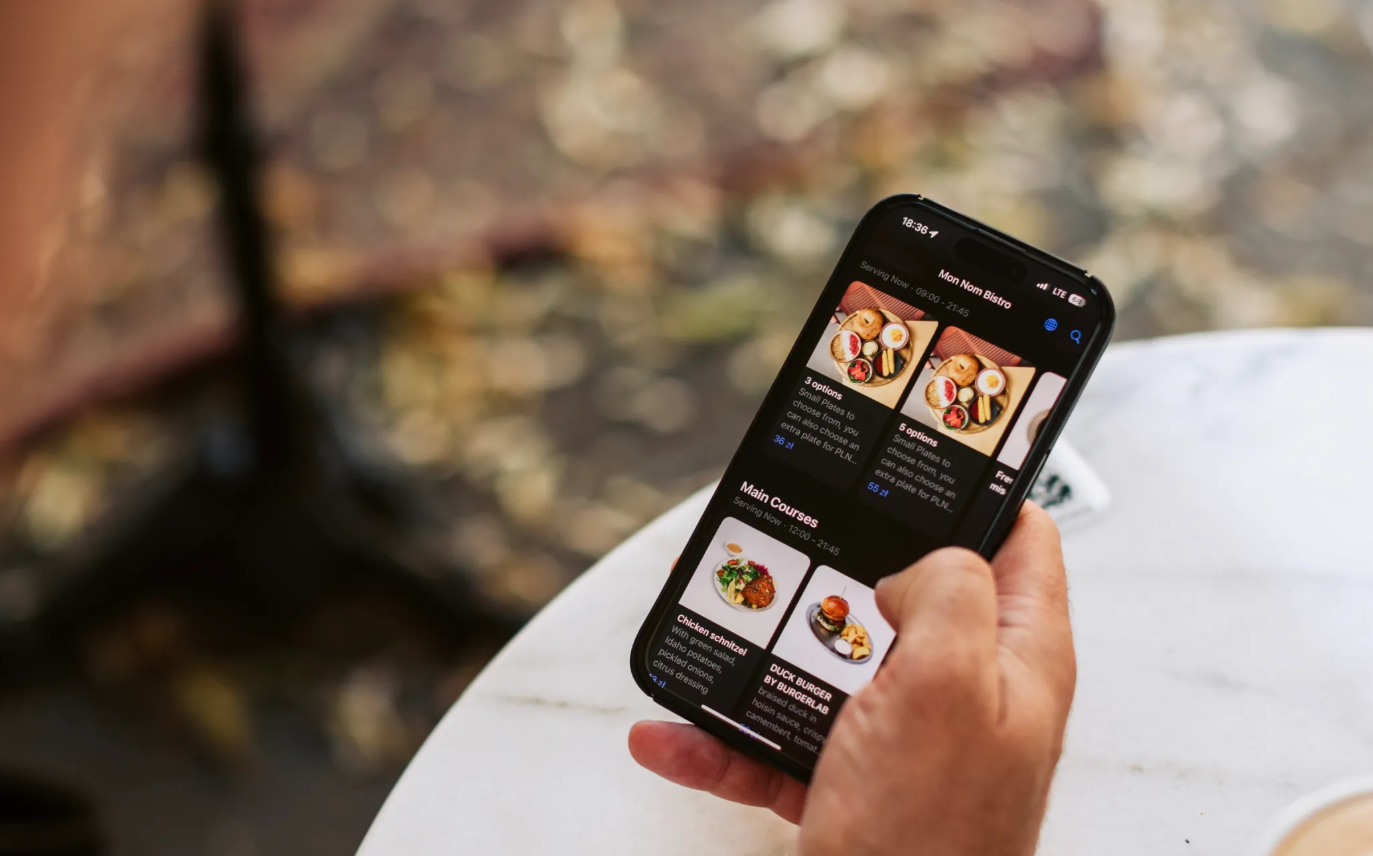
One of the simplest ways to solve these problems is by implementing a QR code menu. This digital solution allows guests to browse your menu, place orders, and even pay directly from their smartphones, cutting down on delays and improving the overall dining experience.

In this guide, we'll walk you through the process of implementing a QR menu in your restaurant, explain how it speeds up service, and share practical tips to ensure a smooth rollout.

Why QR menus improve service speed?

Traditional paper menus require staff to distribute, collect, and sanitise them between guests. Ordering involves waiting for a server to take the order, write it down, and relay it to the kitchen. Payment adds another round of back-and-forth. All of these steps take time.

A QR code menu eliminates most of this friction. Guests scan a code at their table, view the menu on their phone, and submit their order directly to the kitchen. If the system includes payment functionality, they can settle the bill without waiting for a server. This streamlined process reduces wait times, speeds up table turnover, and frees up staff to focus on hospitality rather than logistics.

Key benefits of QR menus for restaurants

Before diving into implementation, it's worth understanding the full range of benefits:

  • Faster order processing. Orders go straight to the kitchen or bar, reducing errors and delays.
  • Higher table turnover. Guests spend less time waiting, so you can serve more customers during peak hours.
  • Reduced staff workload. Servers can focus on delivering food, answering questions, and creating a welcoming atmosphere instead of running back and forth with orders.
  • Improved accuracy. Digital orders eliminate miscommunication between front-of-house and kitchen staff.
  • Easy menu updates. Change prices, add specials, or remove sold-out items in real time without reprinting menus.
  • Better guest experience. Guests appreciate the convenience and control of ordering at their own pace.

Step-by-step guide to implementing a QR menu

1. Choose the right QR menu platform

Not all QR menu systems are created equal. Look for a platform that fits your restaurant's needs and integrates with your existing tools. Key features to consider include:

  • Menu customisation. The platform should let you add photos, descriptions, allergen information, and pricing in a format that matches your brand.
  • Ordering and payment integration. If you want guests to place orders or pay via QR, make sure the system supports these features and connects with your POS.
  • Multi-language support. If you serve international guests, offering menus in multiple languages can improve their experience.
  • Analytics and reporting. Good platforms provide insights into popular dishes, peak ordering times, and guest behaviour.
  • Ease of use. The interface should be intuitive for both staff and guests. Complicated systems slow adoption and frustrate users.

Platforms like GlobalTips offer all-in-one solutions that combine QR menus with ordering, payments, tipping, and loyalty programmes, making them a strong choice for restaurants looking to digitise multiple aspects of their operations.

2. Digitise your menu content

Once you've chosen a platform, the next step is uploading your menu. This involves more than just copying text from a paper menu. Take the opportunity to optimise your content:

  • Use high-quality images. Photos increase engagement and help guests make decisions faster.
  • Write clear descriptions. Highlight key ingredients, preparation methods, and flavour profiles.
  • Organise logically. Group items by category (starters, mains, desserts, drinks) and use filters or tags to help guests navigate.
  • Highlight specials and bestsellers. Draw attention to high-margin items or seasonal dishes.
  • Include allergen and dietary information. This builds trust and helps guests with dietary restrictions order confidently.

3. Generate and place QR codes

Most platforms generate unique QR codes for each table or location. Print these codes on durable materials like laminated cards, table tents, or stickers. Place them where guests will see them immediately, such as:

  • On the table itself
  • On a stand or tent card
  • At the entrance or host stand
  • On receipts or takeaway packaging

Make sure the codes are large enough to scan easily and include a short instruction like "Scan to view menu and order."

4. Integrate with your POS and kitchen systems

For a seamless experience, your QR menu should connect with your POS and kitchen display system. This ensures that orders flow directly from the guest's phone to the kitchen without manual input. Integration also keeps inventory, pricing, and reporting synchronised across all systems.

If your POS doesn't support direct integration, look for platforms that offer API connections or middleware solutions. This step is crucial for avoiding double-entry errors and maintaining operational efficiency.

5. Train your staff

Even though QR menus reduce some tasks, your staff still play a vital role in the guest experience. Train them to:

  • Explain how the QR menu works to first-time users
  • Assist guests who have trouble scanning or navigating the menu
  • Monitor orders and ensure timely delivery
  • Handle special requests or modifications that guests submit digitally

Staff should also understand how to update the menu, manage inventory, and troubleshoot common issues. A well-trained team ensures a smooth transition and helps guests feel comfortable with the new system.

6. Test the system before launch

Before rolling out your QR menu to guests, run internal tests. Have staff and a few trusted customers scan the codes, browse the menu, place orders, and complete payments. Check for:

  • Scanning issues or broken links
  • Menu display problems on different devices
  • Order accuracy and timing
  • Payment processing errors
  • Clarity of instructions and navigation

Fix any issues before going live to avoid frustrating guests during the launch.

7. Promote the new system to guests

When you launch your QR menu, let guests know about it. Use table signage, social media posts, and staff announcements to explain the benefits. Emphasise convenience, speed, and safety. Some guests may be hesitant at first, so offer reassurance and assistance.

Consider offering a small incentive, like a discount or free item, for guests who try the QR menu during the first few weeks. This encourages adoption and helps you gather feedback.

8. Gather feedback and optimise

After launch, monitor how guests and staff are using the system. Collect feedback through surveys, reviews, or direct conversations. Pay attention to:

  • Common questions or confusion points
  • Popular and underperforming menu items
  • Average order times and table turnover rates
  • Technical issues or bugs

Use this data to refine your menu layout, improve descriptions, adjust pricing, and fix any usability problems. Continuous optimisation ensures your QR menu delivers maximum value over time.

Common challenges and how to overcome them

  • Guest resistance. Some guests prefer traditional menus. Keep a few paper menus on hand for those who request them, but gently encourage QR adoption by highlighting its benefits.
  • Technical issues. Ensure your Wi-Fi is strong and reliable. Slow loading times frustrate guests and defeat the purpose of speeding up service.
  • Staff pushback. Involve your team in the decision-making process and address their concerns early. Show them how the system makes their job easier, not harder.
  • Menu complexity. If your menu is very large or complex, consider simplifying it or breaking it into sections to improve navigation.

How QR menus fit into a broader digital strategy?

Implementing a QR menu is often the first step in a larger digital transformation. Once you've mastered digital menus, you can add features like:

  • Cashless tipping. Let guests tip staff directly via QR code, boosting earnings and motivation.
  • Loyalty programmes. Reward repeat customers with points, discounts, or exclusive offers.
  • Review collection. Encourage satisfied guests to leave reviews on Google or TripAdvisor via QR links.
  • Automated marketing. Capture guest data to send personalised promotions and updates.

Platforms like GlobalTips integrate all of these features into one system, making it easier to manage and scale your digital operations.

Choosing the Right Platform

Implementing a QR code menu is one of the most effective ways to speed up service, reduce staff workload, and improve the guest experience. By choosing the right platform, digitising your menu thoughtfully, training your team, and continuously optimising based on feedback, you can create a seamless system that benefits everyone.

Whether you're running a busy café, a fine dining restaurant, or a casual bar, a well-executed QR menu helps you serve more guests, increase revenue, and stay competitive in a digital-first world.

Dzmitry Khabibullin
CEO
Book a demo

Experience the Future of Dining

Transform your venue with our innovative QR code solutions. Book a demo today!

  • No complicated integrations
  • No setup fee
  • Option to allocate commission on clients
  • No additional equipment
Number too short
Number too long
Invalid country code
Invalid number
Join 1400+ venues already using GlobalTips
Thank you for your submission!
We have received it, and we will be in touch with you shortly.
There was an issue processing your form submission. Please try again.
Change cookie settings